> ## Documentation Index
> Fetch the complete documentation index at: https://docs.enso.build/llms.txt
> Use this file to discover all available pages before exploring further.
# Routing Strategies
> Understand `delegate` and `route` routing strategies for shortcuts APIs.
export const date_0 = "2025-08-07"
When using the Shortcuts endpoints (`/shortcuts/route` and `/shortcuts/bundle`), you must choose between two routing strategies: `router` and `delegate`.
Based on the strategy you choose, the Enso API will route your transaction through the appropriate smart contract.
**Use the `tx.to` response value** when sending on-chain a shortcut transaction you obtained.
By avoiding hardcoded addresses, your shortcuts will always be routed to the correct contract, even if the address changes in the future.
For specific addresses, check out [Deployments](/pages/build/reference/deployments)
## When to use `delegate` or `router`?
You must use `delegate` when:
* dealing with [non-tokenized positions](/pages/build/examples/route-nontokenized) where the state is stored in the protocol rather than represented by a token
* you need the state to persist in the user's smart wallet.
## Smart Wallets with `delegate`
Smart Wallet executes the bundle directly through delegate calls, by calling [`EnsoShortcutsDelegate` contract](./deployments), and the wallet itself doesn't hold any tokens during the execution.
```ts theme={null}
// no approvals of input tokens needed
const route = await client.getRouteData({
routingStrategy: "delegate",
//...
});
await signSmartWallet(route.tx, route.gas);
```
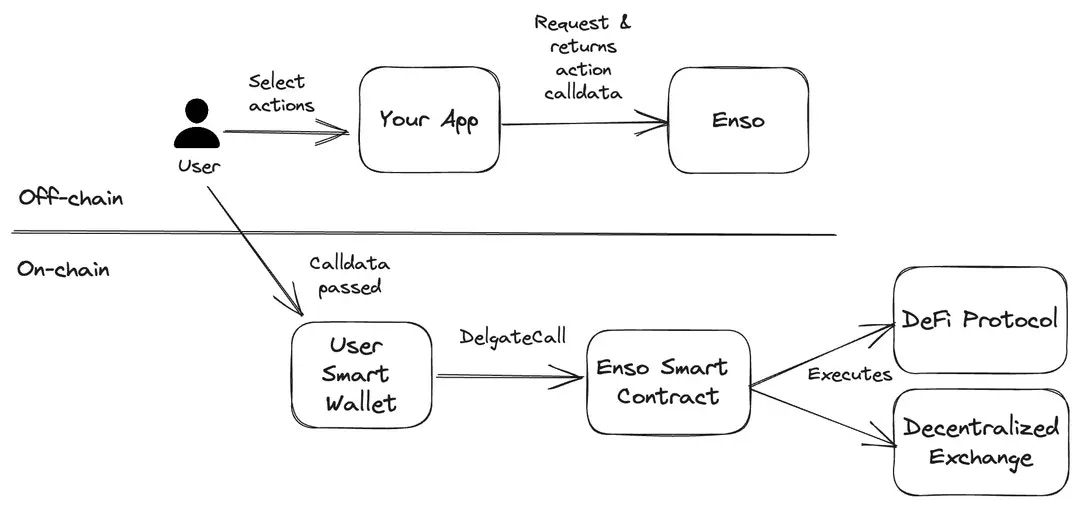 Use `delegate` for smart wallets supporting `delegatecall`:
* Enables both tokenized and non-tokenized interactions
* The state stays in the smart wallet itself.
* Complex, multi-step operations are more efficient and safer when executed through a smart wallet
* Simple approval model
* Limited to token-based operations
## EOAs with `router`
With `router` strategy, the Enso Router contract will hold the intermediate tokens between actions.
With this strategy, you must approve the Enso router contract to operate with your input tokens:
```ts theme={null}
const approval1 = await client.getApprovalData({
tokenAddress: token1,
amount: amt1,
chainId,
fromAddress,
});
const approval2 = await client.getApprovalData({
tokenAddress: token2,
amount: amt2,
chainId,
fromAddress,
});
const route = await client.getRouteData({
routingStrategy: "router",
//...
});
await signEoa(approval1.tx, approval1.gas);
await signEoa(approval2.tx, approval2.gas);
await signEoa(route.tx, route.gas);
```
Use `delegate` for smart wallets supporting `delegatecall`:
* Enables both tokenized and non-tokenized interactions
* The state stays in the smart wallet itself.
* Complex, multi-step operations are more efficient and safer when executed through a smart wallet
* Simple approval model
* Limited to token-based operations
## EOAs with `router`
With `router` strategy, the Enso Router contract will hold the intermediate tokens between actions.
With this strategy, you must approve the Enso router contract to operate with your input tokens:
```ts theme={null}
const approval1 = await client.getApprovalData({
tokenAddress: token1,
amount: amt1,
chainId,
fromAddress,
});
const approval2 = await client.getApprovalData({
tokenAddress: token2,
amount: amt2,
chainId,
fromAddress,
});
const route = await client.getRouteData({
routingStrategy: "router",
//...
});
await signEoa(approval1.tx, approval1.gas);
await signEoa(approval2.tx, approval2.gas);
await signEoa(route.tx, route.gas);
```
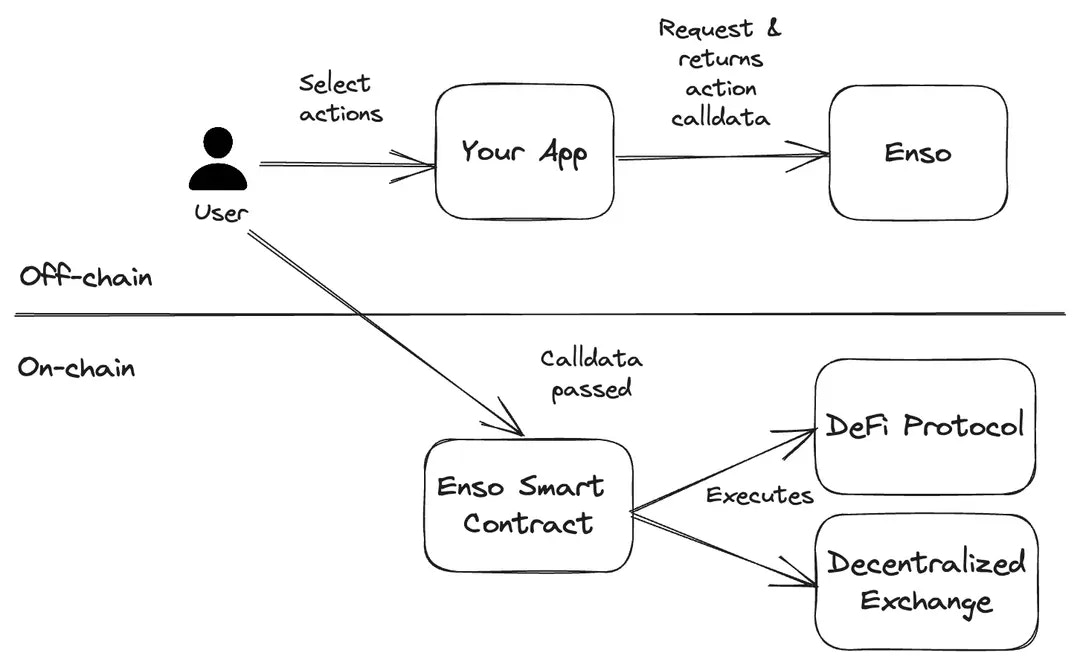 Use `router` strategy for EOAs or simpler smart wallets:
* Works with tokenized interactions only
* Uses the universal router contract.
* Supports tokenized and non-tokenized interactions
* Enables complex DeFi strategies
* Works with lending positions and other stateful interactions
Use `router` strategy for EOAs or simpler smart wallets:
* Works with tokenized interactions only
* Uses the universal router contract.
* Supports tokenized and non-tokenized interactions
* Enables complex DeFi strategies
* Works with lending positions and other stateful interactions