> ## Documentation Index
> Fetch the complete documentation index at: https://docs.enso.build/llms.txt
> Use this file to discover all available pages before exploring further.
# Checkout Widget
> A React component for seamless cryptocurrency deposits from connected wallets
export const date_0 = "2025-09-23"
The Checkout Widget enables wallet-based deposits with built-in cross-chain routing and DeFi token swapping capabilities.
Try out the checkout flow
Add to your app
Key features include:
* **Cross-chain deposits**: Automatic routing between different blockchain networks
* **Real-time quotes**: Live pricing and gas estimates
* **Customizable theming**: Full control over appearance and branding
* **Transaction tracking**: Real-time status updates with block explorer links
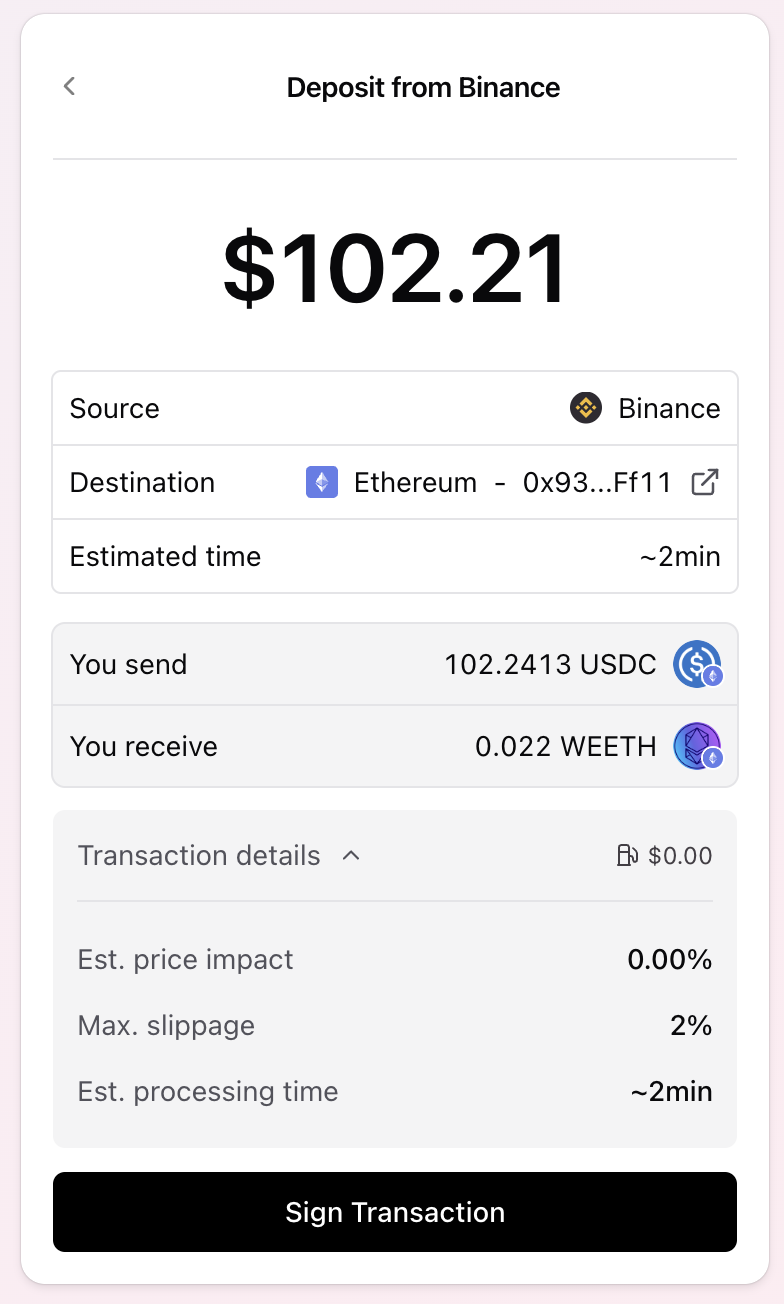 ## How it Works
The widget connects to the connected wallet and allows user to:
1. Select token
2. Enter amount to spend
3. Check quote execution quote and parameters
4. Execute operation and track progress including cross-chain execution
## Integrate
Install the widget:
```
npm i @ensofinance/checkout-widget
```
You can get an API key from the [Developer Portal](https://developers.enso.build).
Import and configure the widget.
Any of the [tokens](/api-reference/tokens/tokens) or [nontokenized positions](/api-reference/tokens/nontokenized-positions) can be used as `tokenOut`
```tsx theme={null}
import { CheckoutModal } from '@ensofinance/checkout-widget';
export function MyCheckoutComponentModal() {
const [isCheckoutActive, setIsCheckoutActive] = useState(false);
return (
);
}
```
```tsx theme={null}
import { Checkout } from '@ensofinance/checkout-widget';
export function MyCheckoutComponent() {
return (
## How it Works
The widget connects to the connected wallet and allows user to:
1. Select token
2. Enter amount to spend
3. Check quote execution quote and parameters
4. Execute operation and track progress including cross-chain execution
## Integrate
Install the widget:
```
npm i @ensofinance/checkout-widget
```
You can get an API key from the [Developer Portal](https://developers.enso.build).
Import and configure the widget.
Any of the [tokens](/api-reference/tokens/tokens) or [nontokenized positions](/api-reference/tokens/nontokenized-positions) can be used as `tokenOut`
```tsx theme={null}
import { CheckoutModal } from '@ensofinance/checkout-widget';
export function MyCheckoutComponentModal() {
const [isCheckoutActive, setIsCheckoutActive] = useState(false);
return (
);
}
```
```tsx theme={null}
import { Checkout } from '@ensofinance/checkout-widget';
export function MyCheckoutComponent() {
return (
);
}
```
The widget requires Wagmi and React Query providers. Set up your app's root component:
```tsx theme={null}
import { WagmiProvider, createConfig, http } from 'wagmi';
import { QueryClient, QueryClientProvider } from '@tanstack/react-query';
import { base, mainnet, arbitrum } from 'wagmi/chains';
import { injected, walletConnect } from 'wagmi/connectors';
// Configure supported chains and connectors
const config = createConfig({
chains: [mainnet, base, arbitrum],
connectors: [
injected(), // MetaMask, Rabby, etc.
walletConnect({
projectId: 'YOUR_WALLETCONNECT_PROJECT_ID'
}),
],
transports: {
[mainnet.id]: http(),
[base.id]: http(),
[arbitrum.id]: http(),
},
});
const queryClient = new QueryClient();
function App() {
return (
{/* Your app components */}
)
}
```
The widget accepts a complete Chakra UI v3 `SystemConfig` for theming.
For advanced theming, refer to the [Chakra UI theming documentation](https://v3.chakra-ui.com/docs/theming/semantic-tokens).
```tsx theme={null}
import { CheckoutModal, type WidgetTheme } from '@ensofinance/checkout-widget';
const customTheme: WidgetTheme = {
theme: {
semanticTokens: {
colors: {
// Background colors
bg: { value: "#ffffff" },
"bg.subtle": { value: "#f8fafc" },
"bg.emphasized": { value: "#f1f5f9" },
// Foreground/text colors
fg: { value: "#0f172a" },
"fg.muted": { value: "#64748b" },
"fg.subtle": { value: "#94a3b8" },
// Border colors
border: { value: "#e2e8f0" },
"border.emphasized": { value: "#cbd5e1" },
// Primary accent color
primary: { value: "#3b82f6" },
"primary.emphasis": { value: "#2563eb" },
// Status colors
success: { value: "#10b981" },
warning: { value: "#f59e0b" },
error: { value: "#ef4444" },
},
},
// Custom button variants
recipes: {
button: {
variants: {
solid: {
bg: "primary",
color: "white",
_hover: { bg: "primary.emphasis" }
}
}
}
}
}
};
function App() {
return (
);
}
```
## Configuration Props
### CheckoutConfig Properties
The following checkout config exists:
| Parameter | Type | Description | Required |
| ------------ | ------------- | --------------------------------------- | -------- |
| `apiKey` | `string` | Your Enso API key | Yes |
| `tokenOut` | `string` | Destination token address | Yes |
| `chainIdOut` | `number` | Destination chain ID | Yes |
| `recipient` | `string` | Recipient address for the output tokens | No |
| `theme` | `WidgetTheme` | Custom Chakra UI theme config | No |
### CheckoutModalProps
The `CheckoutModal` expands `CheckoutConfig` with modal-related properties and callbacks:
| Parameter | Type | Description | Required |
| ------------- | --------------------------- | ---------------------------------------------------------- | -------- |
| `config` | `CheckoutConfig` | Widget [configuration object](#checkout-config-properties) | Yes |
| `isActive` | `boolean` | Controls modal visibility | Yes |
| `setIsActive` | `(active: boolean) => void` | Modal state setter | Yes |
| `onClose` | `() => void` | Close callback function | No |
## Supported Networks
The widget supports deposits across all networks:
* Ethereum (Chain ID: 1)
* Base (Chain ID: 8453)
* Arbitrum (Chain ID: 42161)
* Optimism (Chain ID: 10)
* Polygon (Chain ID: 137)
* Avalanche (Chain ID: 43114)
* BSC (Chain ID: 56)
* And [many more](/pages/build/reference/supported-networks)
## Learn more
* [Crosschain routing](/pages/build/get-started/crosschain-routing)
* [Use Cases](/pages/use-cases)