> ## Documentation Index
> Fetch the complete documentation index at: https://docs.enso.build/llms.txt
> Use this file to discover all available pages before exploring further.
# Uniswap Migrator
> A React component and web app that enables migration of base tokens and DeFi positions from Uniswap V3 to V4 across all supported chains.
export const date_0 = "2025-06-13"
The Uniswap Migrator Widget allows users to:
* migrate base tokens to any chain and
* migrate Uniswap liquidity positions Uniswap V4 pools.
Migrate positions to Uniswap V4 pools
Integrate Uniswap Migrator widget in your app
## How it Works
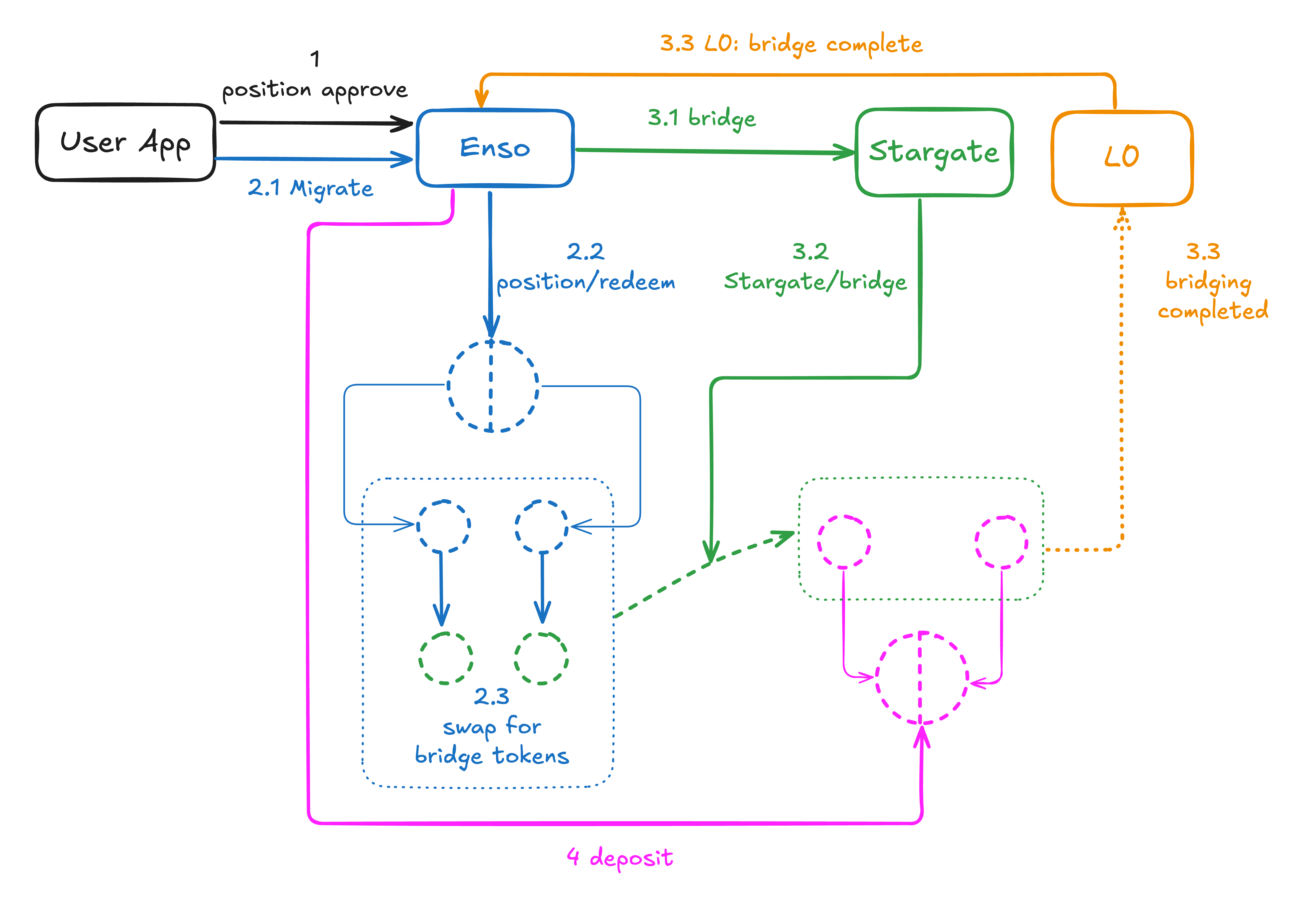
The Uniswap Migrator Widget is an interface to an orchestration of Enso's routing capacities, Stargate bridging system, and Layer0's notification system.
Roughly, the flow is as follows:
1. The user selects the asset to migrate, and the destination Uniswap V4 pool. The user approves Enso's contracts to spend the asset.
2. The user initiates the migration.
2.1. The user initiates the migration.
Enso issues a [transaction bundle](/pages/build/get-started/bundling-actions) that:
2.2. [Redeems](/pages/build/reference/actions#redeem) the assets underlying the user's position on Uniswap V3.
2.3. Swaps the assets to bridge tokens.
3. Bridging takes place
3.1. Enso sends the assets to Stargate.
3.2. Stargate bridges them to the destination chain.
3.3. Stargate notifies Layer0, which notifies Enso.
4. Enso issues a transaction on the destination chain that deposits the assets into the destination V4 pool.
## Integrate
To integrate the Uniswap yield migrator widget, follow the steps below.
```bash theme={null}
pnpm i @ensofinance/uniswap-migrator
```
In case you're starting from scratch, set up a RainbowKit project:
```bash theme={null}
pnpm install @rainbow-me/rainbowkit wagmi viem@2.x @tanstack/react-query
```
Then, edit `package.json` and adjust the version for `viem` to `2.x`:
```json theme={null}
"viem": "2.x",
```
Include the `WidgetWrapper` component in your `/src/pages/index.tsx` file.
```tsx src/App.tsx {6-12, 21} theme={null}
import { ConnectButton } from '@rainbow-me/rainbowkit';
import type { NextPage } from 'next';
import styles from '../styles/Home.module.css';
import dynamic from 'next/dynamic';
const WidgetWrapper = dynamic(
() =>
import("@ensofinance/uniswap-migrator").then((mod) => mod.WidgetWrapper),
{
ssr: false,
}
);
const apiKey = process.env.NEXT_PUBLIC_ENSO_API_KEY || "1e02632d-6feb-4a75-a157-documentation";
const Home: NextPage = () => {
return (
);
};
export default Home;
```
Now you can run your app and see the Uniswap Migrator widget in action!
```bash theme={null}
pnpm run dev
```
Open your browser and navigate to `http://localhost:3000` 🎉
## Next Steps
* [Try the Uniswap Migrator Widget](https://migrate.enso.build/)
* [Learn more about Stargate](https://stargateprotocol.gitbook.io/stargate)
* [Explore Layer0](https://docs.layerzero.network/v2)
* [Find more about Enso's routing capabilities](/pages/build/get-started/route)
 ## Integrate
To integrate the Uniswap yield migrator widget, follow the steps below.
## Integrate
To integrate the Uniswap yield migrator widget, follow the steps below.